
The new VIP system arrives at Amateur.tv with a revolutionary approach: now you have full control over who gets special status in your community. Additionally, we’ve improved album management with 5 new visibility options.
In this guide, we explain all the changes and how to make the most of them.If you’re a model on Amateur.tv, you probably already knew about the subscription system. Users paid a fixed fee to get benefits in your room. However, this model had an important limitation: it didn’t differentiate between someone who simply paid a fee and someone who actively participated in your shows.
That’s why we’ve developed the new VIP system, designed to recognize and reward users who demonstrate their support in a real and consistent way. Below, we tell you everything you need to know.
🚀 What is the new VIP system?
The VIP system is a natural evolution of the old subscription system. Instead of users paying a fixed monthly fee, they now earn VIP status when they reach a tip threshold that you set yourself.
This means users become VIP in your room when they show you real support through their tips and active participation. Therefore, VIP status has much more value: it’s earned by those who truly participate in your Shows.
💡 In summary: You set how many coins a user must contribute to become VIP. When they reach that threshold, they get the status for 30 days. It’s a system that rewards real loyalty, not just an occasional tipper.
How does it work exactly?
The process is very simple. First, you set a coin threshold from your settings panel. Then, when a user accumulates tips equal to or greater than that threshold, they automatically become VIP in your room for 30 days.
It’s important to note that there’s no time limit for accumulating. That is, a user can add up little by little until they reach the threshold. Also, the tips that count are:
- Direct tips: All tips they send you during your LIVE Shows.
- Game tips: All tips they send through your active games and Bots
- Tips during privates: All tips they send while you’re in a private show, exclusive private, or LITE private (not including the per-minute cost)
On the other hand, some tips don’t count towards the VIP threshold:
- Offline tips,
- Platform rewards: all additional tips that Amateur gives during Happy Hours, Red Days, promotions…,
- Tips in Private Messages, and
- Per-minute cost for private shows, exclusive privates, or LITE privates.
This way, the system specifically rewards activity in your LIVE Shows.
✨ Benefits of the VIP system for models
This new system brings multiple advantages that will improve your experience on the platform. Let’s look at the most important ones:
You set the rules
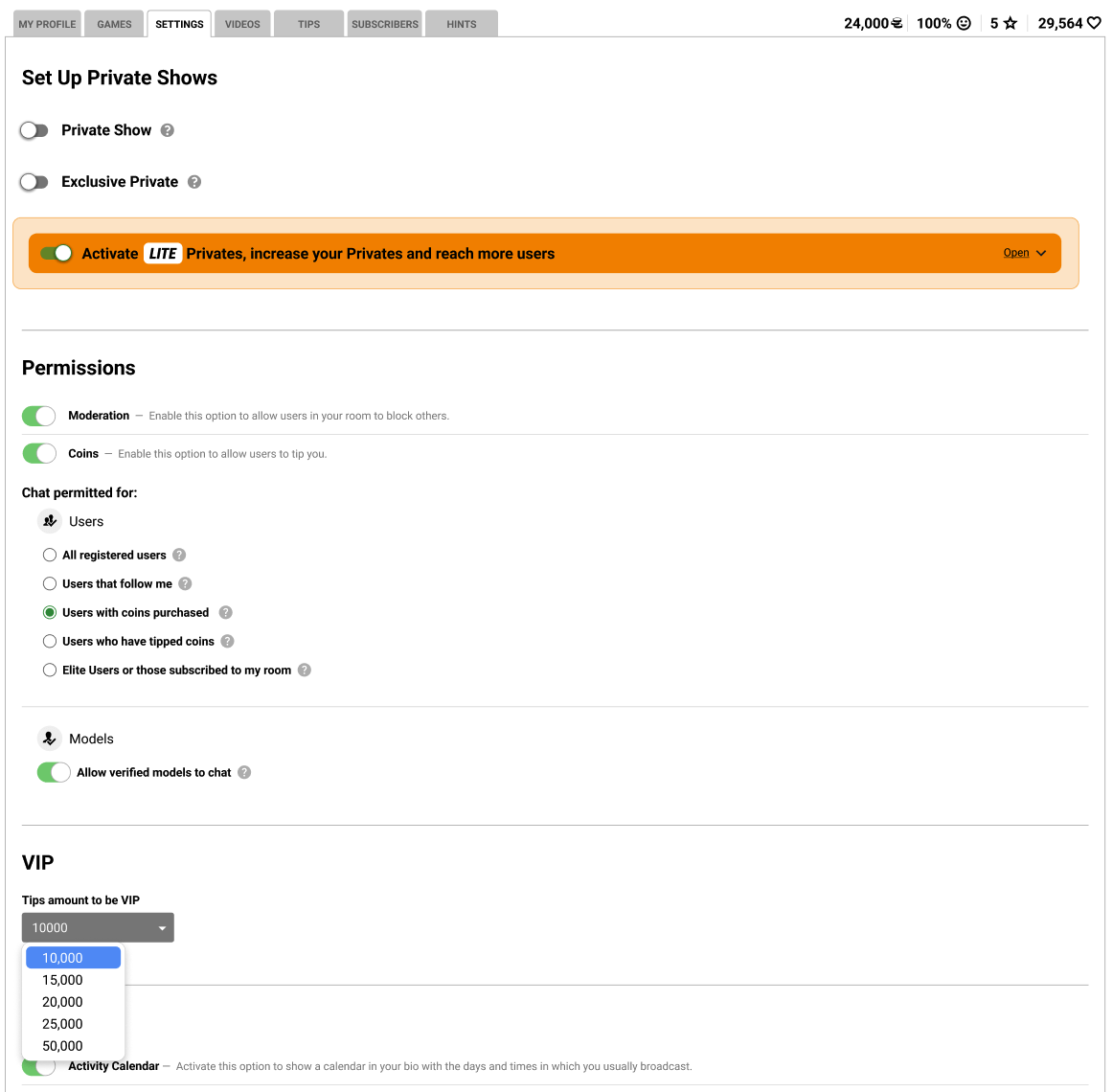
Set the threshold from 10,000 to 100,000 coins according to your strategy
Real value
VIP is earned by those who truly support you and participate in your Shows
Active community
You incentivize real participation in your room
No revocations
VIP isn’t lost due to chargebacks or refunds
Full control over the threshold
One of the biggest advantages of the VIP system for models is the flexibility to set the threshold. You can choose between five different options:
| Threshold | Exclusivity level | Recommended for |
|---|---|---|
| 10,000 coins | Accessible | New models, growing communities |
| 15,000 coins | Moderate | Balance between accessibility and exclusivity |
| 25,000 coins | Medium-high | Models with established community |
| 50,000 coins | Exclusive | Popular models with very active fans |
| 100,000 coins | Ultra exclusive | Top models, very premium status |
Additionally, you can change the threshold at any time. However, it’s important to know that changes don’t affect active VIPs. That is, if someone already earned the status with the previous threshold, they keep their full 30 days.
👑 What benefits do your VIP users get?
When a user becomes VIP in your room, they unlock a series of exclusive benefits that only work with you. This is very important: being your VIP doesn’t give them additional benefits in other rooms.
VIP perks include:
- Create private messages with you: Only VIPs can start private conversations (exclusive to VIP, not even ELITE users will have this benefit!)
- Send photos via PM: They can share images in your conversations
- Highlighted in your chat: They appear with VIP badge and special font
- Access to your VIP galleries: They can see albums you set as VIP-exclusive
- Emojis and GIFs: Use visual content so their messages don’t go unnoticed.
🔑 Important note: The ability to create private messages is exclusive to VIP users. Not even ELITE users have this benefit. This makes VIP status in your room especially valuable.
Guardians = Automatic VIP
Another interesting feature is that your Guardians get automatic VIP in your room. They don’t need to reach the threshold and have no expiration date while they’re Guardians. This way, they can enjoy all the perks while helping you manage your Shows.
🖼️ New album visibility system
Along with the VIP system, we’ve significantly improved your private album management. Now you have 5 visibility options to decide exactly who can see each album.
Public
All registered users
Hidden
Only visible to you
Followers
Only those who follow you
Buyers
Users who have recharged
VIP Only
Exclusive for your VIPs
This flexibility allows you to create tiered content strategies. For example, you can have public albums to attract new followers, follower-only albums to encourage follows, and VIP-exclusive albums that incentivize active participation.
What happens to my current albums?
Your albums that were set for subscribers will temporarily switch to “Hidden”. This is a protective measure so you can consciously decide what visibility you want to give them with the new system.
Once the change is activated, simply go into each album’s settings and select your preferred visibility. It’s a quick and simple process that gives you full control over your content.
📋 How to set up the VIP system step by step
Setting up the new system is very simple. Follow these steps:
Access your Broadcast panel
Log into your account and click on BROADCAST.
Go to Settings > VIP Users
You’ll find a new section dedicated to the new VIP system configuration.
Select your threshold
Choose between the available options (10K, 15K, 25K, 50K, or 100K coins) according to your strategy.
Done!
The system will start working automatically. Your users will see their progress towards becoming your VIP.
🖼️ How to set up your album visibility
Setting who can see each album is very easy. Follow these steps:
Access Photos and videos
In your profile’s side menu, click on Photos and videos.
Go to “My albums”
You’ll see all your created albums in this section.
Select the album to configure
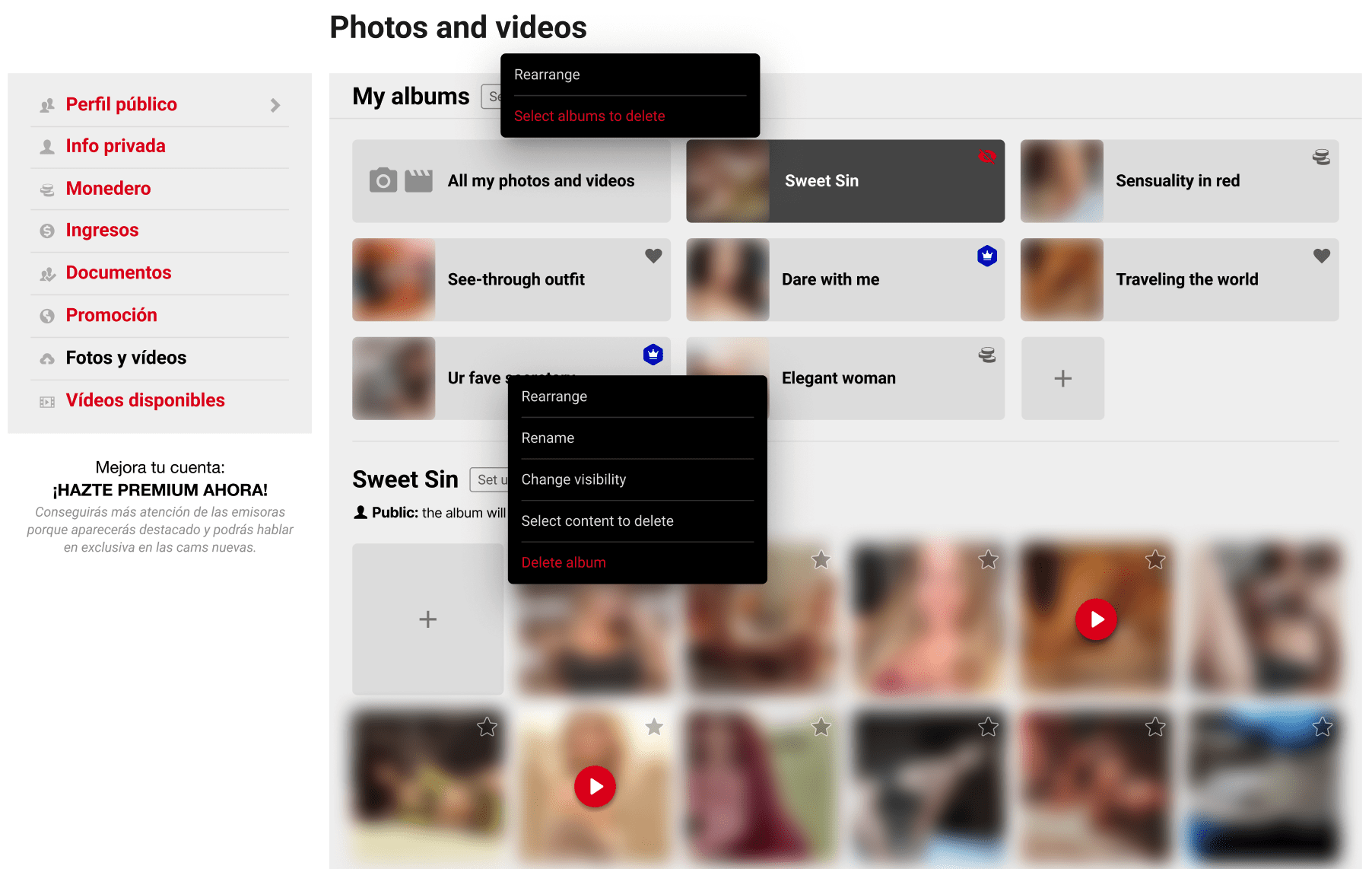
Click on Configure next to the album name, or open the album’s options menu.
Choose “Change visibility”
A dropdown will open with the 5 available options.
Select the visibility type
Choose who can see that album:
- Public: all registered users
- Hidden: only you
- Followers: only those who follow you
- Buyers: users who have recharged at some point
- VIP: only your VIP users
Done!
Repeat the process with each album to assign your preferred visibility.
❓ Frequently asked questions about the VIP system
What happens if a user was already my subscriber?
Active subscriptions will be automatically canceled and won’t renew. As compensation, those users will receive 30 days of free ELITE. Once that period ends, they can become VIP in your room by reaching the threshold you’ve set.
Can I change the threshold later?
Yes, you can modify it whenever you want. Active VIPs will keep their 30 days even if you change the threshold.
Do my VIPs have benefits in other rooms?
No. VIP status is per-model. If someone is your VIP, they only have perks with you. To have special benefits in another room, they need to be that model’s VIP.
What happens when a user’s VIP expires?
They lose VIP perks but existing private conversations remain open. They can become VIP again by reaching the threshold once more.
Do tips during the VIP period count towards the next one?
No. While a user is VIP, their tips don’t count towards the next cycle. The counter starts from 0 when their VIP expires.
🎯 Tips to make the most of the VIP system
To get the most out of the new VIP system, we recommend following these strategies:
- Start with an accessible threshold: If your community is growing, a threshold of 10,000-15,000 coins allows more users to reach VIP and get hooked.
- Communicate the benefits: Remind your users what exclusive benefits they get as VIP, especially the ability to create PMs with you.
- Create exclusive content: Use VIP albums to offer special content that motivates reaching the status.
- Celebrate your VIPs: When someone reaches the status, give them recognition in your room.
- Adjust based on results: Observe how your community responds and adjust the threshold if necessary.
⚡ Remember: The VIP system is designed to create a more authentic relationship with your community. Users who strive to reach the status will be more loyal and participative than those who simply paid an automatic monthly subscription.
🔄 Summary: What changes and what improves
| Aspect | Before (Subscriptions) | Now (VIP System) |
|---|---|---|
| How it’s obtained | Fixed monthly payment | ✓ Reaching tip threshold |
| Model control | No control | ✓ You set the threshold yourself |
| What it rewards | Automatic payment | ✓ Real participation in room |
| Album options | Public / Subscribers | ✓ 5 visibility options |
| Private messages | With subscription | ✓ VIP exclusive (more valuable) |
Set up your VIP system now!
Access your broadcast panel and customize your room’s VIP threshold. Also, don’t forget to configure your album visibility.
Go to Settings →In conclusion, the new VIP system represents a significant improvement that gives you more control, more flexibility, and better tools to manage your community. The changes are designed to reward consistent participation and help you build a more committed fan base.
If you have any questions about the VIP system or need help with setup, don’t hesitate to contact our support team. We’re here to help! 💜